MCP Explained: The Protocol Letting AI Finally Use Your Business Tools
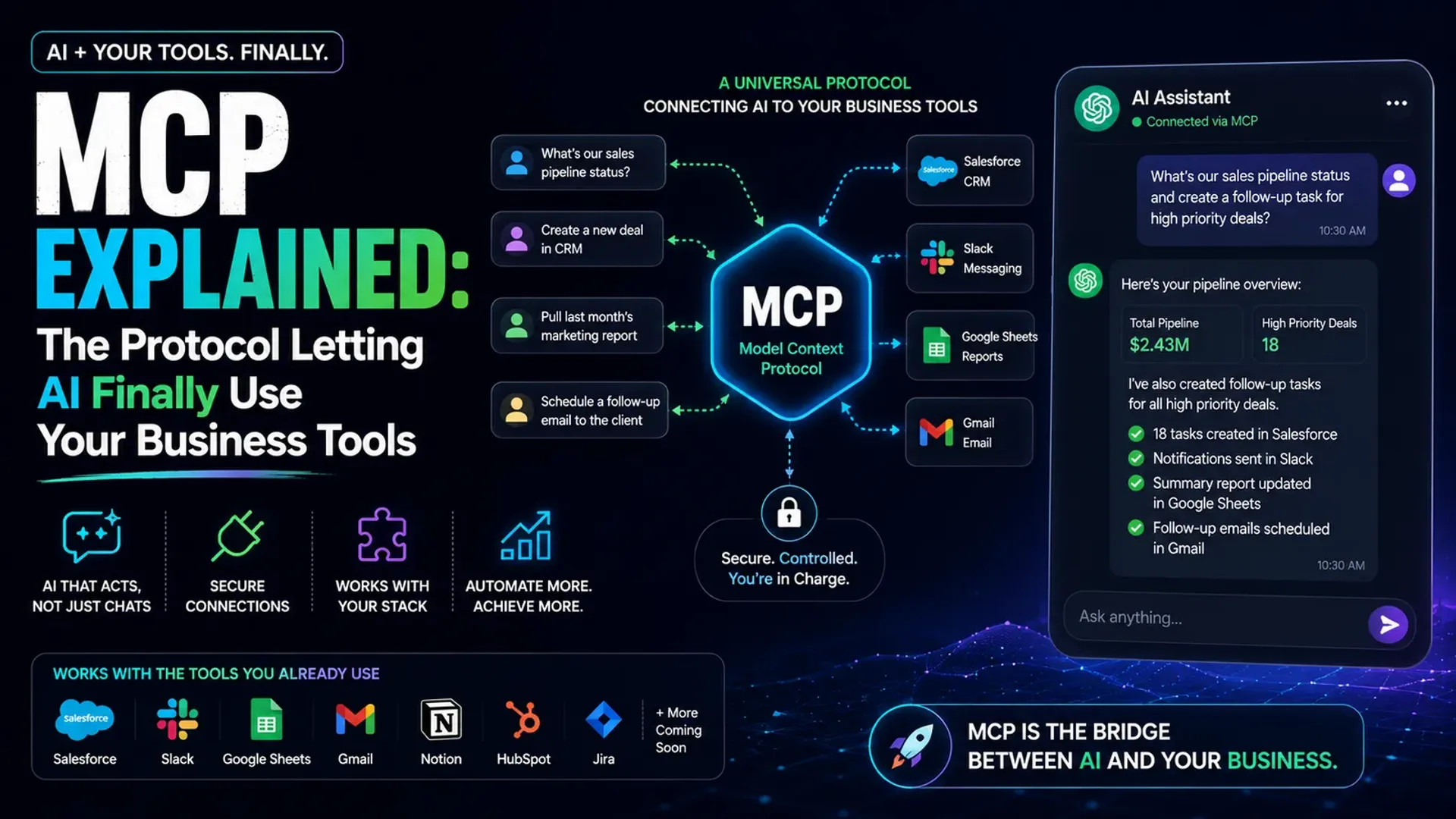
For two years, AI assistants have been brilliant talkers and terrible doers. They could write your email but not send it, summarise your calendar but not book on it, describe what's in your CRM but never update it. The intelligence was real; the hands were missing. The reason was unglamorous but fundamental: an AI model had no safe, standard way to actually use the tools your business runs on. That is precisely the gap MCP closes — and it is quietly the most important shift in how AI works for real companies since ChatGPT launched.
MCP (Model Context Protocol) is an open standard that lets an AI model connect to your real systems — your CRM, calendar, documents, database, support inbox, project tools — through one common interface. Think of it as a universal adapter. Instead of building a fragile custom integration between every AI and every app, each tool exposes an MCP server, and any AI assistant that speaks MCP can use it immediately.
Why this is bigger than 'another integration'
Before MCP, connecting AI to your stack meant bespoke code for every single tool-and-model pairing. Ten tools and three AI assistants meant thirty brittle integrations to build and maintain. It did not scale, and every new app meant starting over. MCP collapses that mess into a simple plug: a tool builds one MCP connector, and every MCP-aware assistant can use it — now and in the future.
It is the same leap the USB port brought to hardware. Before USB, every device needed its own port and its own driver. After USB, one standard connected everything. MCP is doing that for AI and software — and once a standard like that takes hold, it tends to become the default very quickly.
What it actually unlocks for a business
With MCP wired up, an assistant stops being a chat box beside your business and becomes an operator inside it. It can pull a customer's full history from your CRM, draft a context-aware reply, and log the interaction — all in one flow. It can read this week's bookings and rebook a cancellation into the right slot. It can query your sales data and answer 'which product slipped last month, and why?' without you ever opening a spreadsheet.
This is the difference between an AI that describes work and one that does it. It is the same shift we see when businesses move from simple chatbots to real agents — a topic we cover in depth in how businesses use AI agents beyond customer support. MCP is the plumbing that makes those agents genuinely useful.
Where it fits alongside AI agents
People often confuse the two. An AI agent is the worker — the thing that takes a goal and pursues it. MCP is the toolbox that worker reaches into. An agent without tool access can only talk; give it MCP connectors and it can act. If you are weighing whether you need a custom agent or an off-the-shelf assistant, our breakdown of custom AI agents vs ChatGPT pairs naturally with this — MCP is what turns either one into a doer.
How to adopt it without breaking anything
You do not need to rebuild your stack. Start with one high-friction workflow — support triage, lead routing, or reporting — and connect only the tools that workflow touches. Keep access least-privilege: the AI should reach exactly what it needs and nothing more. Keep a human in the loop for anything irreversible, like refunds or sending external messages. Prove it on one workflow, feel the time saved, then expand.
Done this way, MCP is low-risk and high-leverage — the same disciplined approach that lets small teams save 20+ hours a week with AI without adding headcount.
Frequently Asked Questions
Is MCP only for developers?
The setup is technical, but the outcome is not. Once a connector exists, non-technical staff simply talk to an assistant that can now act on real systems. You need a developer to wire it up once, not to use it day to day.
Is it safe to connect AI to my CRM and data?
Yes, when scoped properly — least-privilege access, read-only where possible, and human approval for anything that changes records or sends messages. MCP is a connection standard; your existing access controls still apply on top of it.
Do I actually need MCP, or is it hype?
You do not need it this week, but it is fast becoming the default way AI tools connect to software. Understanding it now means you adopt on your own terms rather than scrambling to catch up later.
What is the difference between MCP and an API?
An API is how one specific app exposes its functions. MCP is a standard layer on top that lets any AI model use those functions in a consistent way — so you build the connection once instead of re-integrating for every model.
If you are exploring where AI could genuinely operate inside your business — not just chat about it — that is exactly what we help with. Book a free call and we will map the single highest-leverage workflow to automate first.
Tap the button and Google will show you our new articles more often — in Search, Top Stories and AI Overviews.
Have a project in mind?
Let’s turn it into an intelligent product. Book a free 30-minute discovery call.
Start your project →