The Fully Automated Business: Connecting Your Website, CRM, and AI Into One Growth Engine
It's 8:47 on a Tuesday morning. Priya, who runs a mid-sized events company, opens her laptop to find three new enquiries from the overnight shift of the internet. By 9:15, all three have received a personalised email laying out her services and pricing. One has already booked a discovery call. The other two have been tagged in her CRM as "warm — follow up Friday." Priya hasn't touched any of it yet. She's still on her first coffee.
Meanwhile, across town, David runs a business roughly the same size. He opens his inbox to find those same three types of enquiry — one from a contact form, one a direct email, one a WhatsApp message. He'll get to them this afternoon. Maybe. The Monday enquiry from last week is still sitting in a folder called "To Reply." The CRM he paid for last year has 47 contacts in it, last updated in March.
The gap between these two businesses isn't budget. It isn't staff count. It's whether they have a business automation system — a set of connected tools that move information, trigger actions, and keep the sales engine running without someone manually pushing every lever.
This post is the capstone of a 15-part series on building a digital-first business. We've covered SEO, websites, lead generation, AI agents, CRMs, and sales funnels — each as a standalone skill. Here, we connect them into one picture: what a truly automated business looks like, how the pieces fit together, and a staged, honest path to building it.
The Problem With Disconnected Tools
Most businesses don't have a technology problem. They have a connection problem.
The website lives in one place. The CRM in another. Email marketing in a third. Bookings in a fourth. Accounting somewhere else entirely. Each tool does its job, but they don't talk to each other — so every handoff between them requires a human to carry the baton. That human is usually you, or someone on your team, doing copy-paste work that feels vaguely like it could be automated but nobody has gotten around to it.
The result is what I'd call the "seven-tab business": you always have seven tabs open because none of your tools surface information to the others. You know a client signed a proposal, but your project tool doesn't. Someone downloaded your lead magnet, but the pipeline doesn't reflect it. A customer complains, and the person handling it has no idea they were a high-value buyer.
Disconnected tools don't just create inefficiency. They create gaps where leads fall through, follow-ups don't happen, and opportunities quietly die while everyone assumes someone else handled it.
Building a connected business automation system means closing those gaps — not with more software, but with thoughtful integration of the tools you already have (or a smaller set of better-chosen ones).
The Connected Loop: What It Actually Looks Like
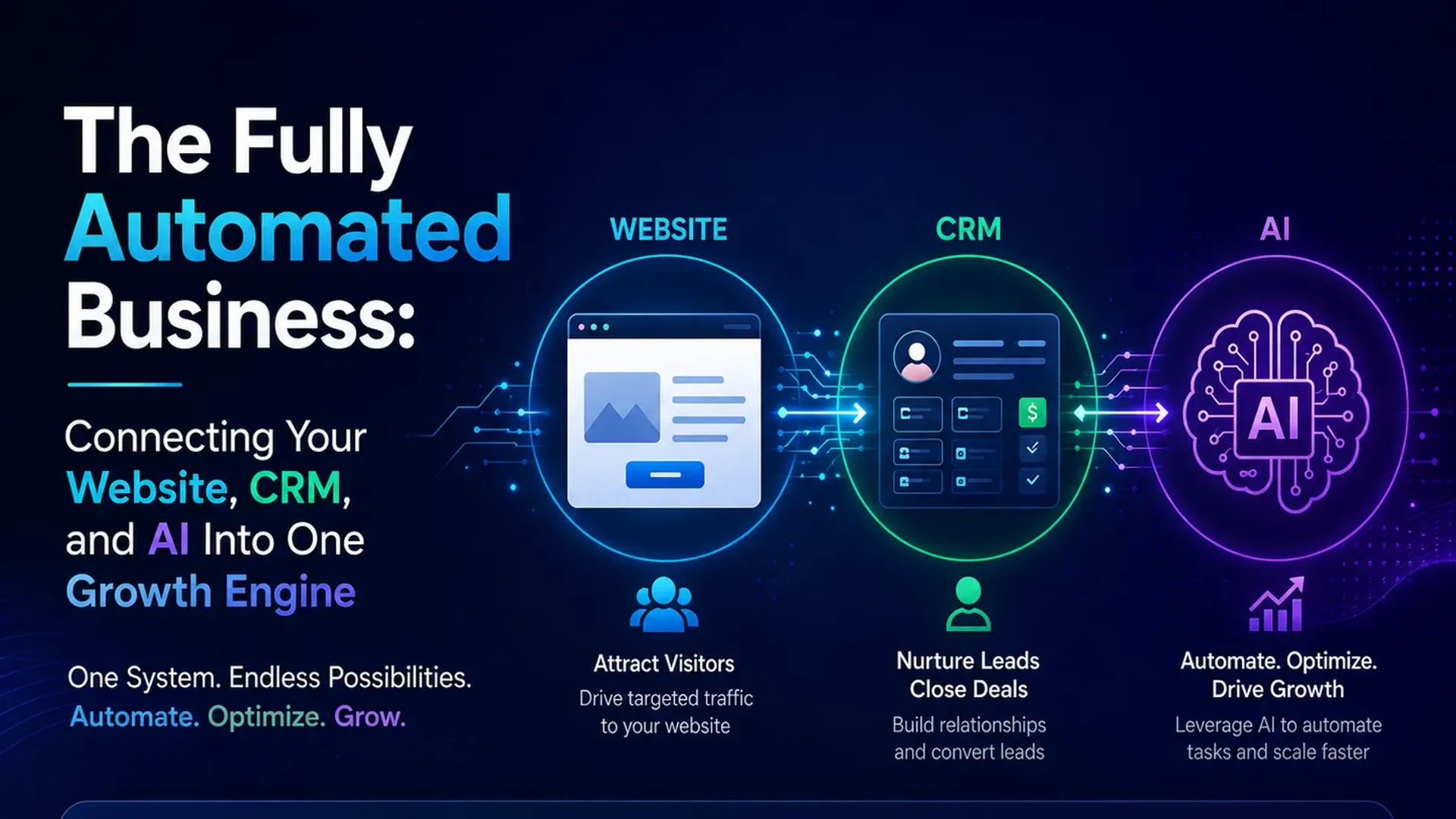
When the pieces work together, a business runs through a loop that looks something like this:
1. Website captures
Someone finds you through search, social, or a referral. They land on your site and take an action — fill in a form, book a call, download something, start a chat. That action is the entry point. A well-built website (with clear CTAs, fast load times, and a form that doesn't ask for their mother's maiden name) means more people actually complete that step. See why most websites fail at this if you need a starting point.
2. CRM organises
The moment someone submits that form, they land in your CRM — automatically, tagged with source and intent. No manual entry. The CRM is your system of record: every touchpoint, every email, every call, in one place. It turns a collection of individual interactions into a managed relationship.
3. AI qualifies and follows up
Not every enquiry is equal, and not every one needs your personal attention at 9am. An AI agent can handle the first response: acknowledge the enquiry, ask two qualifying questions, send relevant information based on what the person asked. If the person meets your criteria for a good fit, the system flags them as high priority and pings you. If they're not ready to buy yet, they go into a nurture sequence. This isn't about replacing human contact — it's about ensuring no one falls through the cracks and that the humans in your business spend their time on conversations that matter.
4. Bookings happen
A qualified lead should be able to book a call without a six-email back-and-forth about availability. A simple scheduling integration — connected to the CRM so the meeting is automatically logged against their record — removes that friction entirely. When the meeting is booked, the system sends a confirmation, a reminder 24 hours before, and a follow-up afterward asking for feedback or next steps. None of this requires a person.
5. Data feeds back and improves
This is the part most businesses miss. Every action — which pages people visited before converting, which emails got replies, which lead sources produced high-value clients — generates data. A connected system surfaces this as insight. You stop guessing and start knowing: LinkedIn leads close faster than Google leads for you; pricing page enquiries convert at twice the rate of blog enquiries; day-three follow-ups outperform day-one ones. You use that to tighten the loop, and the system improves itself over time.
A Day in the Life: Automated vs Manual
It helps to see this mapped side by side.
The manual business (most businesses right now)
- Enquiry comes in at 6pm. No one sees it until the next morning.
- Details are manually copied into a spreadsheet or CRM.
- A response goes out half a day later. Three emails settle a meeting time.
- After the meeting, a reminder is set manually. It gets buried. Follow-up is late or absent.
- Month-end reporting is a manual spreadsheet exercise.
The automated business
- Enquiry at 6pm. Response at 6:01pm — no human required.
- Lead created in CRM automatically, tagged with source and page visited.
- AI qualifies, scores, and routes: high-fit gets a calendar link; low-fit enters a nurture sequence.
- Booking confirmed and logged in CRM without anyone touching it.
- Post-meeting follow-up and feedback prompt go out automatically.
- Monthly dashboard is live. You review, not rebuild.
Same steps. Different actor. The humans are freed for the work that actually needs them: good conversations, judgment calls, relationships.
The Building Blocks (and Which Ones You Actually Need)
This is where most "automation" content goes wrong — it presents a 20-tool stack that costs a fortune and requires someone to maintain it full time. The reality is simpler.
A functional business automation system for most small to mid-sized businesses needs four layers:
- A website that converts. Fast, mobile-ready, with clear CTAs and forms that work. This is the top of the funnel; if it leaks, everything downstream suffers. This is the domain of good web development, not just design.
- A CRM with workflow automation. HubSpot, Pipedrive, Go High Level — pick one and actually use it. The specific platform matters less than whether your leads are going into it and whether your team is working from it. A CRM that isn't used is just expensive dead weight.
- An AI layer for qualification and follow-up. This could be a chatbot on your site, an AI-driven email sequence, or a custom AI agent that handles the initial conversation. It doesn't need to be sophisticated — it needs to be fast and consistent.
- An integration layer. Tools like Make (formerly Integromat) or Zapier connect your systems so information flows without manual input. This is the "glue" — often invisible, always underrated.
If you want to go further — custom AI agents, predictive lead scoring, automated content personalisation — that's possible. But it's the second chapter, not the first. Start with these four layers working properly.
The Honest Truth About the Messy Middle
Here's what the automation consultants tend not to say: the first few months are irritating.
You'll set up a Zap that breaks when someone uses an unexpected email format. Your CRM tags will get messy because three people defined "qualified" differently. The AI follow-up will go out with a typo in the first name field for two weeks before anyone notices. None of this means automation is wrong for your business — it means automation amplifies what you've built. Garbage data in, garbage automation out. An unclear offer automated at scale just annoys more people faster.
The businesses that get this right spend time getting the foundations right before they automate: clear messaging, a defined customer journey, clean data. Then the automation works because it's systematising something that already works.
Automate what's working, not what you hope will work. The shortcut of automating a broken process just breaks it at higher speed.
The Staged Path: Don't Boil the Ocean
If you're starting from zero — or close to it — here's a realistic sequence that won't overwhelm you or require a six-month project:
Stage 1: Connect your website to your CRM (Week 1–2)
Every form submission should automatically create a contact in your CRM. This single step — an afternoon's work — eliminates manual data entry and ensures no lead is lost to a missed email. Most CRMs have native form integrations, or you can use Zapier for anything custom.
Stage 2: Automate your first-response (Week 2–4)
Set up an automated email that goes out within five minutes of a new enquiry. It doesn't need to be AI-written — a warm, well-crafted template is fine to start. The goal is speed: the research consistently shows responding within the first hour dramatically improves conversion. Let the system handle the first touch while you're in meetings or asleep.
Stage 3: Add a follow-up sequence (Month 2)
Most leads don't convert on first contact. A short sequence — three to five emails over two weeks — that adds value and addresses common objections recovers a meaningful percentage of leads that would otherwise go cold.
Stage 4: Add AI qualification (Month 2–3)
Layer in an AI-powered qualification step — a chatbot that handles the first conversation on your site, or an AI responder that asks clarifying questions and routes leads based on answers. Your human team now only deals with leads that are already pre-qualified.
Stage 5: Build the feedback loop (Month 3 onwards)
Track which sources produce the best leads. A simple dashboard — most CRMs have one built in — shows you weekly where enquiries come from, how many convert, and where they drop off. Use this to make better decisions about where to invest next.
Actionable Takeaways
- Map your current customer journey from "first contact" to "paying client" — identify every manual handoff and write it down. Those are your automation opportunities.
- Check whether your website forms are connected to your CRM. If not, fix that this week. It's the single highest-leverage first step.
- Set up an automated first-response email for new enquiries. Even a templated, non-AI response sent within five minutes outperforms a personalised email sent six hours later.
- Pick one CRM and commit to it for 90 days. Add every contact. Log every interaction. You can't automate what you can't see.
- Before adding more tools, ask: does what I already have talk to each other? Fix the connections before adding new layers.
- Identify one workflow — just one — where a human is doing something a rule-based system could handle. Automate that first.
- Once you're capturing lead source data in your CRM, review it monthly. Let the data tell you where to invest.
Frequently Asked Questions
What does a business automation system actually cost to set up?
Ongoing software typically runs $150–$500 per month covering a CRM, email platform, and integration tool. Upfront setup with an agency ranges from $2,000–$5,000 for a basic connected pipeline, higher for custom AI components. Compare that against what your current manual process costs in staff time and lost leads — most businesses find payback within the first quarter.
How long does it take to build a fully automated business?
A functional first version — website connected to CRM, automated first-response, basic follow-up sequence — can be running in four to six weeks if you're focused. A mature system with AI qualification and proper reporting takes three to six months to stabilise. Expect a process, not an event.
Do I need to be technical to automate my business?
For the basics — Zapier connections, CRM workflows, email sequences — most platforms are built for non-technical users. For custom AI agents or complex logic, working with someone who builds these regularly is worthwhile. The risk of DIYing advanced automation isn't that it's impossible — it's that a misconfigured system causes more problems than it solves.
What's the difference between automation and AI automation?
Standard automation follows rules: if X happens, do Y. It's deterministic and predictable. AI automation adds judgment — reading the content of an enquiry and routing it based on what was said, drafting a personalised response, or identifying which leads are most likely to convert. Both are valuable; most businesses need the rule-based layer working well before the AI layer adds meaningful value.
Can a small business really compete with larger ones using automation?
Yes. A five-person business with a well-connected system can respond faster and follow up more consistently than a 50-person business running on manual processes. It's not a complete equaliser, but it closes the gap more than most people expect.
Where do most businesses get stuck when trying to automate?
Messy data, usually. Contacts scattered across spreadsheets, email threads, and half-used CRMs. The second stumbling block is trying to automate too much at once. Businesses that succeed start with one workflow, get it right, then expand. The ones that fail try to overhaul everything simultaneously and end up with a complex system nobody trusts.
Ready to Build Your Growth Engine?
The gap between Priya's business and David's isn't talent or ambition. It's that Priya spent time connecting her tools so they work as a system. That work is front-loaded, but once it's running it compounds. Every enquiry is handled. Every lead is followed up. Every good conversation gets a clean, professional experience from first contact to signed contract.
That's what a real business automation system looks like. Not a utopia where no one works — a well-oiled machine where the right work gets done by the right actor, human or software, at the right moment.
If you're wondering where to start, the honest answer is: it depends on your current setup and your biggest bottlenecks. That's exactly the kind of conversation we have with business owners every week. We can look at what you have, map the gaps, and give you a realistic picture of what a connected system would look like for your business — without overselling what's possible. Start a conversation with us here. No pitch deck, just a practical discussion about where you are and what's worth building next.
Tap the button and Google will show you our new articles more often — in Search, Top Stories and AI Overviews.
Have a project in mind?
Let’s turn it into an intelligent product. Book a free 30-minute discovery call.
Start your project →