Growth is exciting.
More customers. More projects. More revenue.
The first instinct for most business owners when work starts piling up is simple: hire another employee.
But here's the question every founder should ask before posting that job listing:
Do I really need another person—or do I need a better system?
Many businesses unknowingly hire employees to perform repetitive, manual tasks that modern automation can complete in seconds. From copying customer information between platforms to chasing invoices and preparing reports, countless hours are spent on work that doesn't directly contribute to business growth.
Hiring should always be about adding expertise, creativity, and strategic thinking—not increasing headcount just to keep up with administrative work.
That's where business process automation comes in.
Workflow automation isn't about replacing employees. It's about removing repetitive tasks so your team can focus on work that actually creates value.
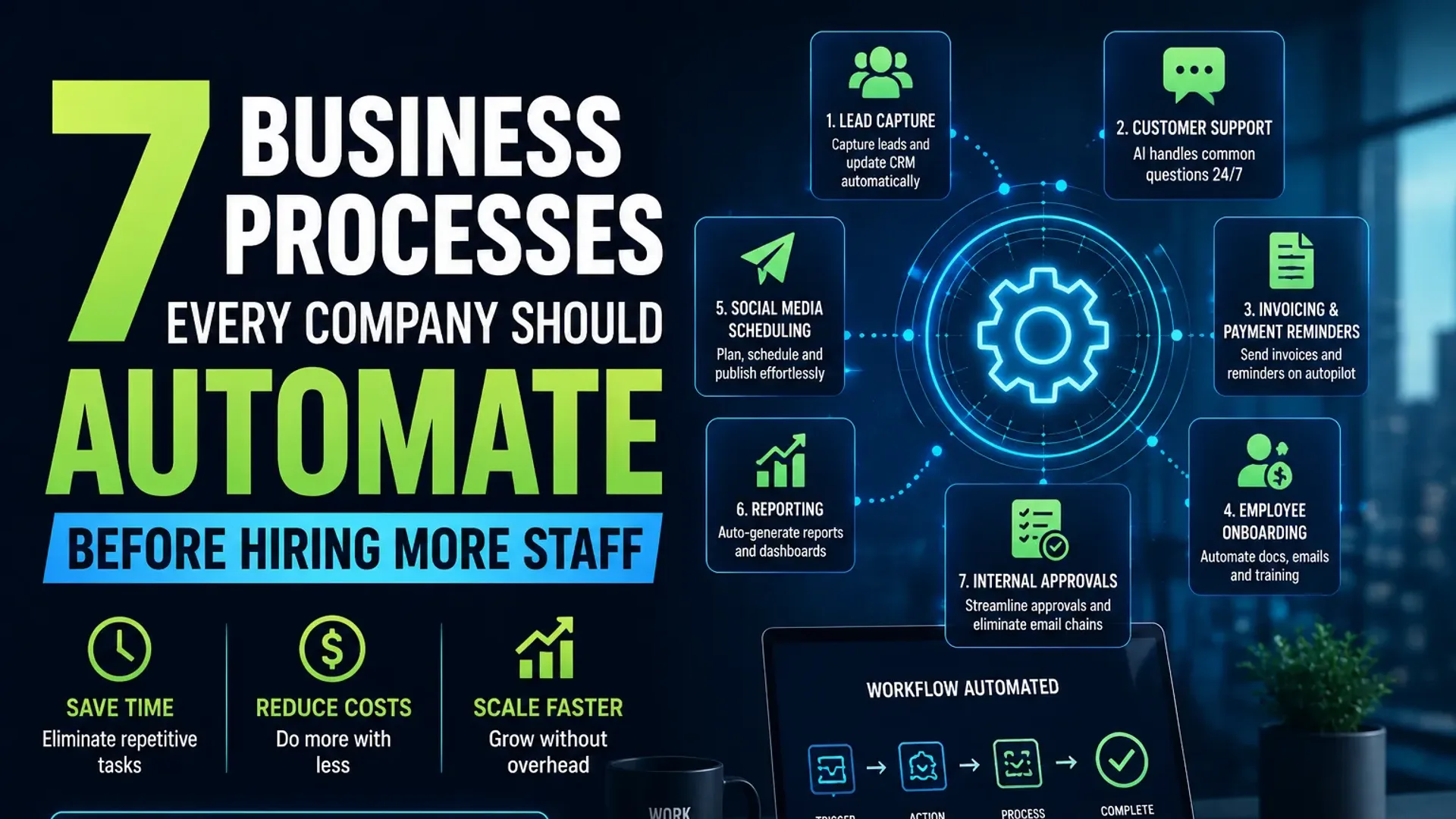
In this guide, we'll look at seven business processes every company should automate before hiring more staff and explain how doing so can save time, reduce costs, and help your business scale smarter.
What Is Business Process Automation?
Business Process Automation (BPA) is the use of software, AI, and digital workflows to automate repetitive business tasks with minimal human intervention.
Instead of manually moving information from one system to another or relying on employees to complete routine tasks, automation handles those processes automatically.
Examples include:
- Automatically sending invoices
- Updating CRM records
- Scheduling appointments
- Routing customer inquiries
- Creating reports
- Sending follow-up emails
- Managing employee onboarding
The goal isn't to eliminate people from your business.
It's to eliminate repetitive work that slows them down.
When your employees spend less time on administrative tasks, they can dedicate more time to customers, innovation, and business growth.
Why Hiring Isn't Always the Best First Solution
Imagine hiring a full-time employee whose primary responsibility is copying data between spreadsheets and your CRM.
That might have made sense ten years ago.
Today, software can complete the same work instantly—and often with fewer errors.
Hiring before optimizing your processes often leads to:
- Higher payroll costs
- Longer onboarding times
- More management overhead
- Increased chances of human error
- Slower workflows
Automation allows businesses to grow without increasing operational complexity.
It creates systems that scale alongside your business instead of requiring additional people every time workloads increase.
1. Lead Capture and Qualification
Every business wants more leads.
But surprisingly, many businesses still collect leads manually.
A customer fills out a website form.
Someone checks the inbox.
They copy the details into a spreadsheet or CRM.
Another employee assigns the lead to a salesperson.
Then someone remembers to send a follow-up email.
That's a lot of unnecessary steps.
What Should Be Automated?
Every new inquiry should automatically:
- Enter your CRM
- Notify the right salesperson
- Assign follow-up tasks
- Send a personalized confirmation email
- Categorize the lead based on interest or industry
- Schedule reminders if no action is taken
Instead of taking ten minutes, the entire process can happen in less than ten seconds.
Why It Matters
The faster you respond to a lead, the more likely you are to convert them into a customer.
Automation ensures that no inquiry is forgotten, misplaced, or delayed.
For growing businesses, this alone can significantly improve conversion rates while reducing administrative work.
2. Customer Support
Customer expectations have changed dramatically.
People don't want to wait until business hours to receive answers.
They expect immediate responses—even at midnight.
That doesn't mean your support team should work around the clock.
It means repetitive questions should never require human intervention in the first place.
Questions Customers Ask Every Day
- What are your business hours?
- How much does your service cost?
- Can I book an appointment?
- Where is my order?
- How do I reset my password?
- How do I contact support?
These questions are predictable.
Which makes them perfect candidates for automation.
What AI Can Handle
Modern AI-powered chatbots can:
- Answer FAQs instantly
- Schedule appointments
- Collect customer information
- Recommend products or services
- Route complex issues to human agents
- Provide support 24/7
Instead of replacing customer support representatives, AI acts as the first point of contact.
Support teams can then focus on solving complex customer issues rather than answering the same questions repeatedly.
3. Invoice Generation and Payment Reminders
Cash flow is the lifeblood of every business.
Unfortunately, many businesses still rely on manual invoicing.
Employees create invoices individually.
Someone remembers to send payment reminders.
Another person tracks overdue payments.
As customer numbers grow, this process quickly becomes overwhelming.
Workflow Automation Can
- Generate invoices automatically
- Send invoices immediately after project completion
- Schedule payment reminders
- Notify your finance team when payments arrive
- Flag overdue accounts
- Update accounting software automatically
This eliminates repetitive follow-ups and reduces the chances of invoices slipping through the cracks.
Why This Matters
Late payments hurt cash flow.
Automation ensures invoices are sent on time, reminders are consistent, and payments are tracked accurately.
Your finance team spends less time chasing payments and more time managing business finances.
4. Employee Onboarding
Hiring a new employee should be exciting.
Instead, it often becomes a long checklist of repetitive administrative tasks.
Creating accounts.
Sending welcome emails.
Sharing company documents.
Scheduling training sessions.
Requesting signatures.
Every new hire follows almost the same process.
Which makes onboarding one of the easiest workflows to automate.
Automate the Entire Experience
An automated onboarding workflow can:
- Send offer letters
- Collect required documents
- Create company accounts
- Share employee handbooks
- Schedule training sessions
- Introduce new hires to their team
- Assign onboarding tasks automatically
Everything happens in the correct order without HR manually managing every step.
Better Experience for Everyone
New employees feel welcomed immediately.
HR teams save hours every week.
Managers spend less time following up on paperwork.
Automation creates a consistent onboarding experience while reducing delays.
5. Social Media Scheduling
Creating content consistently is one of the biggest challenges for marketing teams.
Many businesses create a post, publish it manually, and repeat the same process every day.
Not only is this time-consuming, but it also leads to inconsistent posting schedules.
How Workflow Automation Helps
Instead of publishing content one post at a time, businesses can:
- Schedule weeks of content in advance
- Automatically publish posts across multiple platforms
- Recycle evergreen content
- Receive reminders for upcoming campaigns
- Monitor publishing status
Automation doesn't replace creativity.
It simply removes the repetitive task of manual publishing.
This allows marketing teams to spend more time creating better content and less time clicking the "Publish" button.
6. Business Reporting and Analytics
Ask almost any manager how they spend Monday mornings.
The answer is usually the same:
Building reports.
Downloading spreadsheets.
Copying numbers.
Creating charts.
Emailing updates.
These reports are important—but creating them manually every week wastes valuable time.
Automate Your Reporting
Modern reporting tools can automatically:
- Pull data from multiple platforms
- Update dashboards in real time
- Email reports to stakeholders
- Highlight unusual trends
- Track KPIs automatically
Instead of spending hours preparing reports, your team can spend that time analyzing the data and making better decisions.
Good reporting isn't about creating spreadsheets.
It's about acting on the insights they provide.
7. Internal Approvals
Every growing business eventually develops approval processes.
Purchase requests.
Leave applications.
Marketing approvals.
Budget sign-offs.
Vendor contracts.
Unfortunately, many businesses still manage these through long email threads or chat messages.
This creates delays, confusion, and missed approvals.
Workflow Automation Makes It Simple
Approval workflows can automatically:
- Route requests to the correct manager
- Send reminders for pending approvals
- Notify employees once decisions are made
- Maintain approval records
- Escalate delayed requests
Employees always know the status of their requests, while managers spend less time searching through email chains.
The result is faster decision-making and a more organized business.
The Benefits of Automating Before Hiring
Businesses that invest in automation before expanding their workforce often experience immediate improvements.
Some of the biggest benefits include:
- Lower operating costs
- Faster response times
- Fewer manual errors
- Higher employee productivity
- Better customer experiences
- Improved consistency across teams
- More time for strategic work
Most importantly, automation helps businesses scale without adding unnecessary operational complexity.
Instead of solving problems with more people, you solve them with better systems.
Final Thoughts
Hiring talented people will always be essential.
But your employees shouldn't spend their time copying data, chasing invoices, creating repetitive reports, or manually routing requests.
Those are jobs for automation.
Business process automation isn't about replacing your team—it's about empowering them to focus on the work that truly matters.
Start by identifying one repetitive process in your business.
Automate it.
Measure the results.
Then move on to the next.
Over time, these small improvements compound into a business that's faster, more efficient, and far easier to scale.
Before hiring another employee, ask yourself one simple question:
Can this process be automated first?
If the answer is yes, you'll likely save thousands of hours—and thousands of dollars—while building a stronger, smarter business.
Frequently Asked Questions
What is business process automation?
Business process automation (BPA) uses software and AI to automate repetitive tasks like invoicing, lead management, reporting, approvals, and customer support, reducing manual work and improving efficiency.
What's the difference between workflow automation and business process automation?
Workflow automation focuses on automating individual tasks or sequences of actions, while business process automation improves entire operational processes across multiple departments.
Is automation only for large businesses?
No. Small and medium-sized businesses often see the biggest benefits because automation allows them to grow without significantly increasing payroll or administrative overhead.
Which process should I automate first?
Start with the task that consumes the most time and is repeated most often—such as lead management, customer support, invoicing, or reporting. Quick wins build momentum for broader automation.
Ready to Automate Your Business?
At Alternate, we help businesses eliminate repetitive work with custom AI agents, intelligent workflows, and end-to-end automation solutions.
Whether you're looking to streamline operations, improve customer experiences, or scale without constantly hiring, we can build automation systems tailored to your business.
Work smarter. Scale faster. Automate with Alternate.
Tap the button and Google will show you our new articles more often — in Search, Top Stories and AI Overviews.
Have a project in mind?
Let’s turn it into an intelligent product. Book a free 30-minute discovery call.
Start your project →